
In this article, we break down key considerations, best practices, and practical tips to help businesses make informed decisions about their office technology and communication systems.
Quantum-Resistant Printers: Real Security Threat or Marketing Hype?
If you've been following tech news lately, you've probably heard some alarming phrases: "Quantum computers will break all encryption," "Your data isn't safe," and now, apparently, "Your printer needs quantum resistance."
HP has introduced quantum-resistant security features in their business printers, claiming they're preparing for a future where traditional encryption gets cracked like an egg.
So here's the question every business owner is asking: Is this something you actually need to worry about, or is it just the latest security buzzword being used to sell more expensive equipment?
Let's break it down.
What Is Quantum-Resistant Printing (And Why Is HP Talking About It)?
Here's the quick version:
Traditional encryption (the stuff protecting your data right now) relies on math problems that are incredibly hard for regular computers to solve. It would take thousands of years for a normal computer to crack modern encryption.
Quantum computers use fundamentally different technology that could, theoretically, solve these problems much faster—potentially breaking current encryption methods in hours or days instead of millennia.
Quantum-resistant encryption (also called post-quantum cryptography) uses new mathematical approaches that even quantum computers can't easily crack.
HP's quantum-resistant printers incorporate these new encryption standards to protect data being sent to and from your printer—both now and in a theoretical future where quantum computers are widespread.
The technology is real. The threat is... complicated.
The Actual Threat: "Harvest Now, Decrypt Later"
Here's why organizations like the NSA and NIST (National Institute of Standards and Technology) are taking quantum threats seriously:
Bad actors could be collecting encrypted data right now with the plan to decrypt it later once quantum computers become powerful enough. This is called "harvest now, decrypt later" attacks.
So even if quantum computers aren't breaking encryption today, sensitive data transmitted today could be at risk in 5-10 years when quantum technology matures.
For most businesses? This is not a meaningful threat.
For government contractors, healthcare organizations handling long-term patient data, financial institutions, or companies with highly sensitive IP? It's worth considering.
What HP Actually Did (And Whether It Matters)
HP integrated post-quantum cryptographic algorithms into their enterprise printers, specifically in models like:
- HP LaserJet Enterprise flow MFP series
- HP PageWide Enterprise printers
- Select HP OfficeJet Pro models
These printers use quantum-resistant encryption for:
- Secure boot processes
- Firmware updates
- Data transmission between devices and networks
- Print job encryption
HP also includes:
- Runtime intrusion detection (monitors for unusual behavior)
- Self-healing firmware (automatically restores if compromised)
- Whitelisting (only authorized code can run)
This is all legitimately good security. The question is whether the quantum-resistant piece matters to your business right now.
Does Your Business Actually Need Quantum-Resistant Printers?
Let's be brutally honest about threat levels:
You Probably DON'T Need to Worry About Quantum Resistance If:
- You're a small to medium business in retail, hospitality, or general services
- Your printed documents aren't classified or highly sensitive
- Your biggest security concern is keeping printers from jamming, not nation-state attacks
- You're printing invoices, contracts, and standard business documents
Why? Because even if quantum computers crack encryption in 10 years, the average business isn't a target for sophisticated "harvest now, decrypt later" attacks. Cybercriminals go after easier prey with simpler methods—phishing, weak passwords, and unpatched software.
You SHOULD Pay Attention to Quantum-Resistant Security If:
- You're in healthcare with long-term patient records (HIPAA compliance)
- You're a government contractor or work with classified information
- You handle financial data or transactions at scale
- You're in legal, dealing with confidential case files
- Your intellectual property is worth millions and has long-term value
Why? Because the data you're handling today could be valuable for decades, and you're a more attractive target for sophisticated attacks.
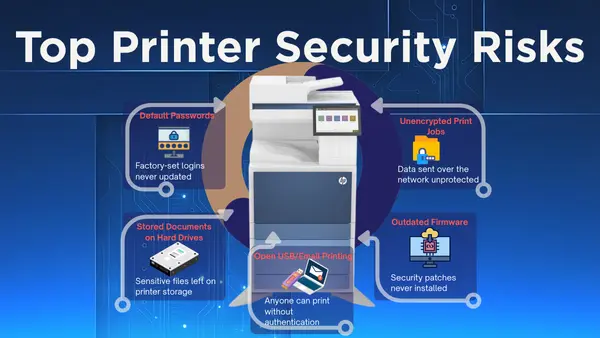
The Real Printer Security Threats (That Actually Matter Today)
Here's what's actually compromising businesses right now—no quantum computers required:
1. Unsecured Network Printers
Most office printers are connected to the network with default passwords and zero security updates. Hackers use them as entry points to access the broader network.
2. Unencrypted Print Jobs
Data sent from your computer to the printer often travels unencrypted across your network. Anyone on the same network can intercept it.
3. Stored Documents on Hard Drives
Many multifunction printers have hard drives that store temporary copies of everything printed, scanned, or copied. If you don't securely wipe these when you return a lease or dispose of equipment, you're handing over data.
4. Outdated Firmware
Printers rarely get security updates, leaving known vulnerabilities open for years. Manufacturers release patches, but most businesses never install them.
5. Open USB/Email Printing
Features that let anyone email or USB-print to your device without authentication create easy access points for malicious documents or malware.
The Bottom Line: Quantum resistance is future-proofing. But if your printer still has the factory default password, you have bigger problems to solve first.
What Good Printer Security Actually Looks Like (Quantum or Not)
Whether you're worried about quantum computers or just want to stop being the low-hanging fruit, here's what matters:
Basic Printer Security Hygiene:
✅ Change default passwords on all networked printers
✅ Enable user authentication (require login to print/scan)
✅ Encrypt print jobs in transit
✅ Update firmware regularly (or choose devices with auto-updates)
✅ Disable unused features (guest printing, open email-to-print)
✅ Segment printers on your network (separate from critical systems)
✅ Wipe hard drives before returning leased equipment or disposing of devices
Advanced Security (For Higher-Risk Environments):
✅ Intrusion detection and self-healing firmware (like HP offers)
✅ Secure boot and whitelisting (prevents unauthorized code execution)
✅ Quantum-resistant encryption (future-proofs sensitive communications)
✅ Audit logging (track who printed what and when)
✅ Physical security controls (badge readers, secure print release)
The good news? Most modern enterprise printers offer these features. The bad news? Most businesses never turn them on.
HP vs. Ricoh vs. Canon: Who's Actually Securing Printers?
Let's compare what the major players are doing on security:
HP's Approach:
- Quantum-resistant encryption in enterprise lines
- Self-healing firmware (HP Sure Start)
- Runtime intrusion detection
- Whitelisting and secure boot
- Marketing focus: Heavy on "world's most secure printers" messaging
Ricoh's Approach:
- TPM 2.0 encryption standard across enterprise devices
- Trusted Platform Module for secure credential storage
- Ricoh Always Current Technology (automatic security updates)
- Data overwrite and encryption for internal storage
- Marketing focus: Security as part of holistic workflow/compliance
Canon's Approach:
- McAfee embedded security on select models
- Secure boot and firmware verification
- Hard drive encryption and overwrite
- User authentication and access controls
- Marketing focus: Integration with existing enterprise security systems
The Reality: All three manufacturers offer solid enterprise security. HP is currently leading on quantum-resistant messaging, but whether that matters depends entirely on your threat model.
For 90% of businesses, the differences are negligible—what matters is whether you actually configure and use the security features you're paying for.
Should You Pay Extra for Quantum-Resistant Printers?
Here's the practical take:
If you're buying/leasing enterprise printers in 2025 anyway, getting devices with quantum-resistant encryption doesn't hurt—especially if it's included at no extra cost. It's future-proofing, and the underlying security features (firmware protection, intrusion detection) are valuable today.
If you're being upsold specifically on quantum resistance, ask yourself:
- What's the actual threat to my business?
- Do I have basic security fundamentals covered first?
- Am I paying a significant premium for this feature?
- Does my industry/compliance framework require it?
If you're a dental office, retail shop, or general small business, quantum resistance is overkill. Focus on the fundamentals.
If you're handling sensitive long-term data in healthcare, finance, legal, or government work, it's a reasonable consideration—but still secondary to basic security hygiene.
How Elevated Group Approaches Printer Security
At Elevated Group, we help businesses figure out what security they actually need versus what's being sold as the "latest thing."
Here's how we approach it:
1. Assess Your Real Risk Level
What data are you printing? Who has access? What's your compliance requirement? Not every business needs Fort Knox-level printer security.
2. Start with the Basics
Before worrying about quantum computers, let's make sure your printers have:
- Strong passwords
- Encryption enabled
- Firmware updates configured
- User authentication active
3. Match Security to Your Industry
Healthcare and legal? We prioritize HIPAA/compliance-ready features and long-term data protection.
Retail and hospitality? We focus on network segmentation and basic access controls.
Government contractors? Yes, let's talk quantum resistance.
4. Include Security in Your Lease
When you lease through Elevated Group:
- ✅ We configure security settings during setup (not left to default)
- ✅ Firmware updates are included and managed
- ✅ Secure data wiping when you return equipment
- ✅ Monitoring for security issues
You're not paying extra for "security theater"—you're getting devices properly secured from day one.
The Bottom Line: Quantum Resistance Is Real, But It's Not Your Top Priority
Quantum-resistant printers aren't snake oil. The technology is legitimate, and for certain high-security environments, it's a smart addition.
But for most businesses, it's like buying a fireproof safe when you haven't locked your front door yet.
Here's what actually matters:
- Basic printer security (passwords, encryption, authentication) is where 90% of businesses are failing
- Regular firmware updates close vulnerabilities that are being exploited right now
- Proper device configuration at setup prevents most security issues
- Quantum resistance is future-proofing for organizations with long-term sensitive data
If a vendor is using "quantum-resistant" as their primary sales pitch, ask them about the fundamentals first. If they can't clearly explain how they handle firmware updates, user authentication, and data encryption today, their quantum resistance claims are just marketing.
Ready to Actually Secure Your Printers (Without the Hype)?
We help businesses evaluate printer security based on real risk, not fear-based marketing.
Here's what happens next:
- Book a 15-minute security assessment with our team
- We'll ask about your data, compliance needs, and current setup
- You get a clear recommendation on what security features actually matter for your business
- If quantum resistance makes sense for you, we'll explain why. If it doesn't, we'll tell you that too.
👉 Schedule Your Free Printer Security Assessment
Because your printers should be secure—but you shouldn't overpay for features you don't need.
Elevated Group – Printer Security Without the Scare Tactics
P.S. — Already have HP, Ricoh, or Canon printers but not sure if they're properly secured? We can audit your current setup and close the gaps—no new equipment required. Book your security audit here.
Frequently Asked Questions
Q: Are quantum computers actually a threat to my business today?
No. Quantum computers powerful enough to break modern encryption don't exist yet in any practical sense. The concern is "harvest now, decrypt later" attacks where adversaries collect encrypted data today to decrypt in 5-10 years. This is only relevant if your data has long-term value and you're a target for sophisticated attacks.
Q: Does quantum-resistant encryption slow down printing?
No. The performance impact is negligible. Modern processors handle post-quantum algorithms efficiently enough that users won't notice any difference in print speeds or processing.
Q: Do I need quantum-resistant printers to be HIPAA or SOC 2 compliant?
Not yet. Current compliance frameworks don't require quantum-resistant encryption. However, NIST is actively working on post-quantum cryptography standards, and these may eventually be incorporated into compliance requirements.
Q: Can I add quantum resistance to my current printers?
Probably not. Quantum-resistant encryption typically requires hardware support (like specific TPM chips) and firmware designed for these algorithms. Retrofitting older equipment isn't practical.
Q: Is HP the only company offering quantum-resistant printers?
HP is currently the most aggressive in marketing quantum resistance, but other manufacturers are incorporating NIST's post-quantum cryptographic standards as they finalize. Ricoh and Canon are also implementing these standards in their enterprise lines.
Q: What should I do if I already leased non-quantum-resistant printers?
Don't panic. Focus on maximizing the security features your current devices have—encryption, authentication, firmware updates, secure data wiping. For most businesses, these fundamentals matter far more than quantum resistance.
Q: How much more expensive are quantum-resistant printers?
In most cases, quantum resistance is being rolled into enterprise models at no significant premium—it's becoming a standard feature rather than an expensive add-on. If a vendor is charging substantially more specifically for quantum resistance, that's a red flag.